Proactive Campaigns
Email campaigns to reach your customer list and follow up on mail performance.
About this app
Simplify bulk email marketing in your Zendesk Support!
Send email campaigns straight to your mailing list and easily track mass email engagement. Build targeted lists by uploading a CSV file or creating one in the app. Customize your outreach with unique Zendesk email templates. Plus, schedule your mail campaign or SMS campaign for the perfect time to maximize impact.
Boost your Zendesk email marketing efforts with us, and start sending email newsletters today!
💡 Start your 14-day free trial today — install with one click.
Unlike third-party tools, Proactive Campaigns works directly inside Zendesk Support, no extra integrations. If you want a guided walkthrough, book a free 15-minute demo to see how our add-on works.
Key Features:
Send bulk emails and SMS campaigns directly from Zendesk.
Import your own email list with a CSV file.
Filter and create lists of customers, tickets, or organizations.
Design custom email templates, save & reuse.
Personalize emails with auto-insert placeholders.
Create email automations with scheduled timing.
- New! Run A/B tests on your email campaigns to improve results.
- Track email opens and link clicks (Email Tracking integration).
Use CSAT surveys in email campaigns.
Precheck campaigns to avoid spam filters.
Create follow-ups based on customer behavior.
What Can You Do with Proactive Campaigns?
🚨 Keep customers informed during incidents
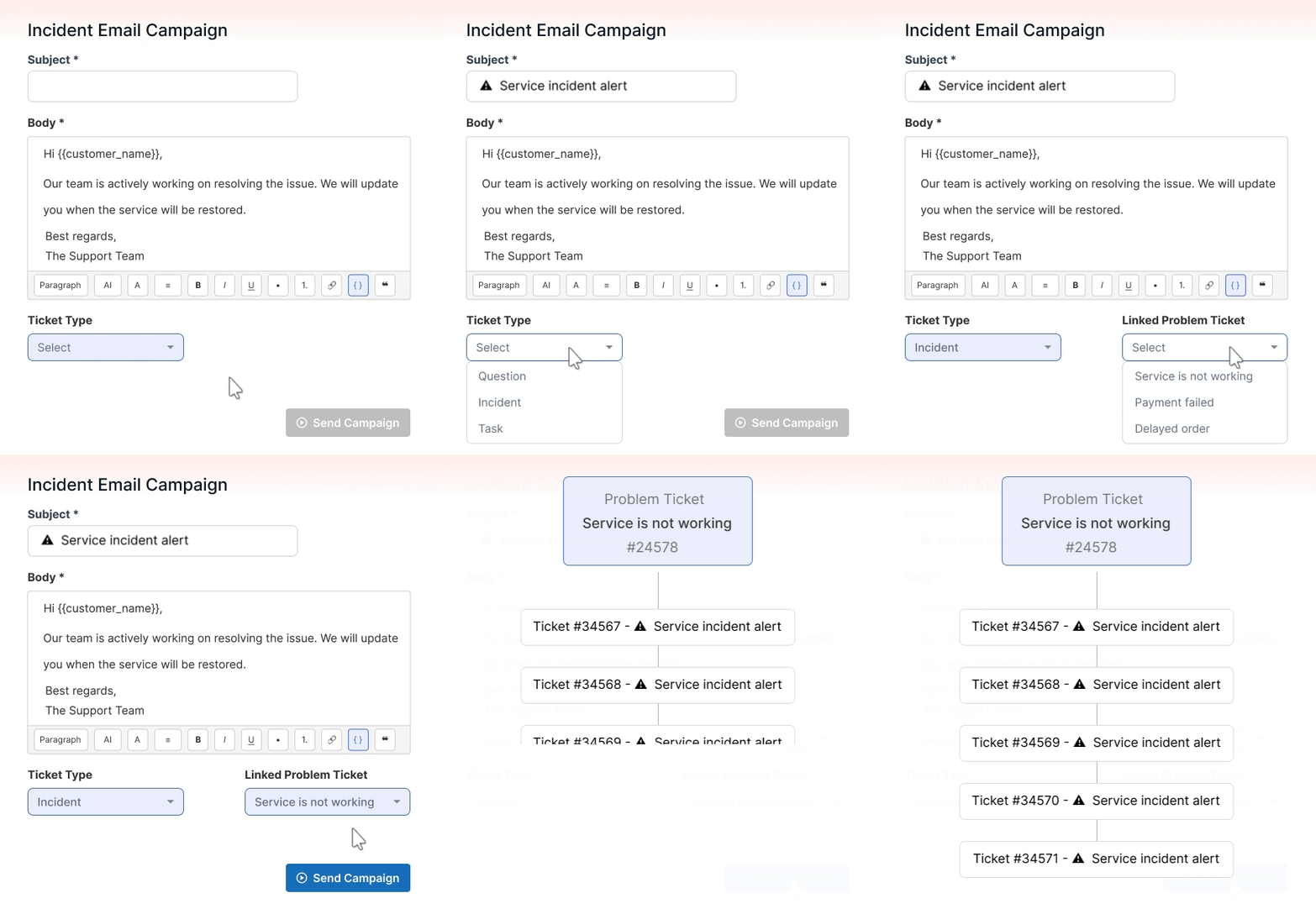
Incidents like delays, downtime, or payment issues happen regularly. With Proactive Campaigns, you can quickly send proactive bulk emails, link each campaign to the relevant problem ticket, and keep your team coordinated in context. Also, use automatic follow-ups with fixed delays until the situation is resolved.
📬 Automate onboarding and guide customers continuously
Keep new users engaged from the moment they sign up with personalized, automated email sequences. Segment your Zendesk customer list by tags, dates, or custom fields, or upload a CSV, and guide customers through every step of their journey, saving your support team hours of repetitive work.

🔄 Boost conversions with ongoing upsell campaigns
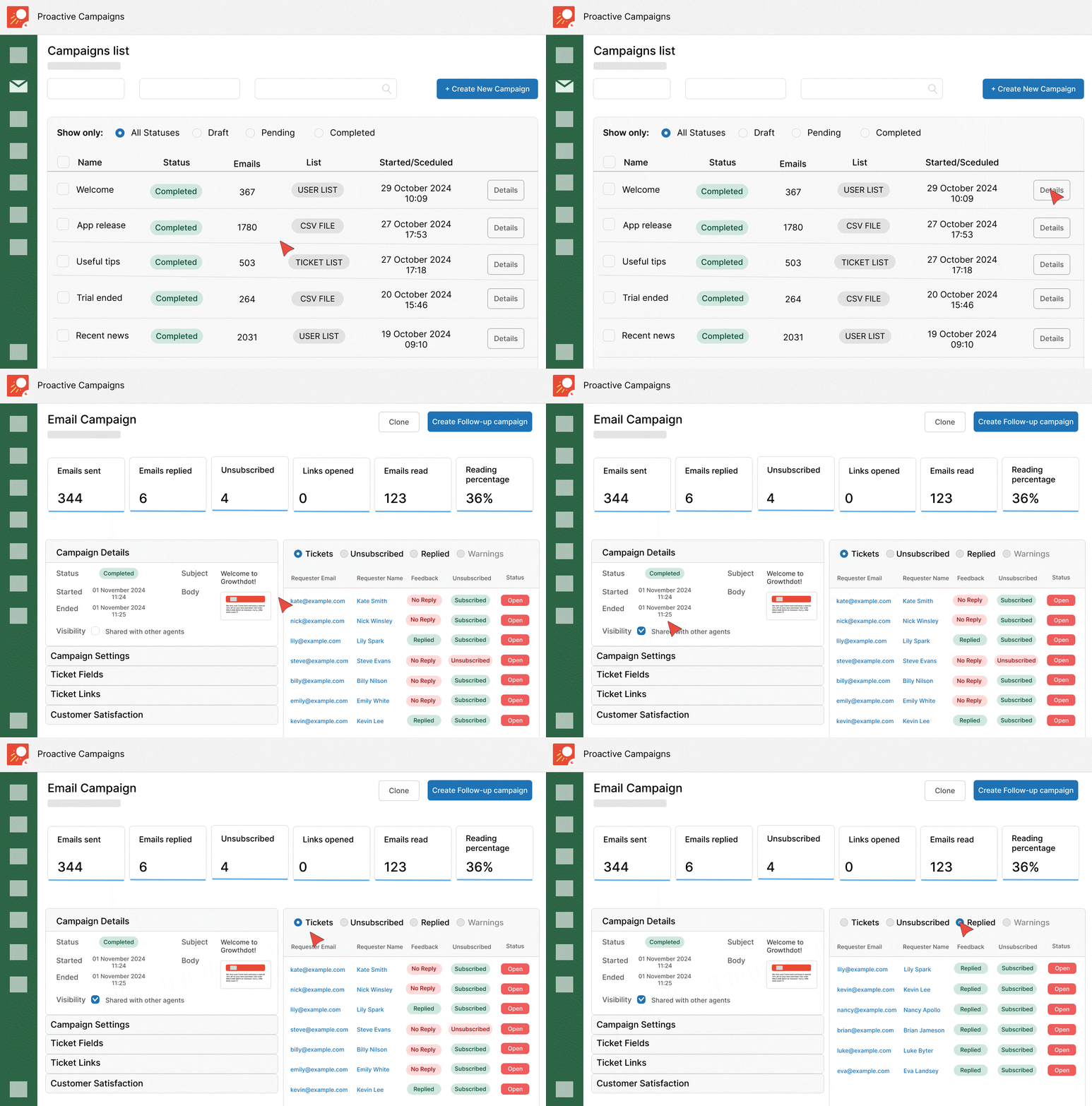
Send personalized follow-ups that nurture interest and drive cross-sells over time. Track opens, clicks, replies, and unsubscribes to continually optimize your messaging and timing, so your campaigns keep improving with every send.
📲 Reduce churn with timely SMS reminders
Schedule campaigns to automatically notify customers about subscription renewals, expiring services, or other important dates via email or SMS. Proactive Campaigns ensures you never miss a chance to stay top-of-mind and retain customers.

🎨 Build and improve email templates for regular customer updates
Create multiple branded email templates using rich text, HTML, or a drag-and-drop builder, and reuse them across campaigns. Add visuals, attachments, macros, and personalized placeholders (merge tags), then tweak and refine your templates to boost engagement and drive greater impact.

📢 Re-engage inactive clients with automated sequences
Reconnect with customers who haven’t interacted in a while using automated email sequences. Plan the timing, messages offering discounts or special promotions, and let the campaign run automatically to remind customers of your product’s value.

🎯 Continuously optimize campaigns with A/B testing
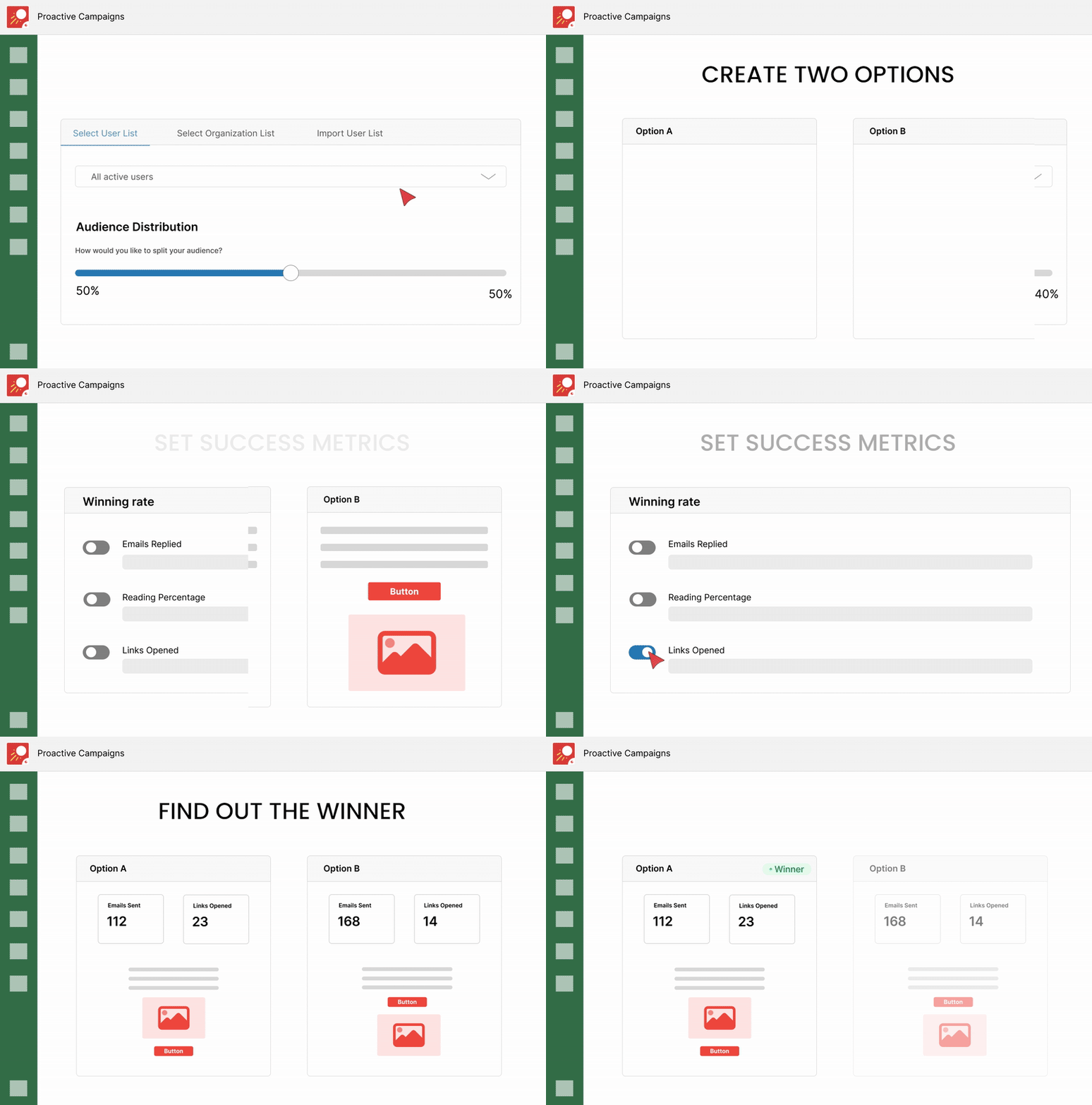
Test two versions of an email (different subject lines, content, or calls to action) on split segments of your list. Use insights from each campaign to fine-tune your ongoing communications strategy.
🛠 Streamline your team’s daily workflow with bulk ticket updates
Beyond messaging, Proactive Campaigns helps manage tickets with bulk updates to fields, statuses, and internal notes. Reduce repetitive tasks and keep your team aligned internally, day after day.

Pay only for agents who have access to the app
You're only charged for the agents who really use the app—no overpaying! Check out all pricing plans here. P.S. The plugin is completely free for Sandbox accounts!
Want to see it in action? 👉 Install the app and activate your free trial now!

How we handle your data
Proactive Campaigns app accesses only the minimal data needed to deliver campaign features, fully following Zendesk guidelines. All actions happen entirely inside your Zendesk account. Your information is encrypted, stored securely on AWS, and never shared with third parties, keeping your data safe at all times.
If you still have questions about the app, ask us at contact@growthdot.com.
Details zur App
Installationsanweisungen
Proactive Campaigns comes with a 14-day free trial. Follow these steps to install and start using the app:
- Click the Install button on the right panel.
Choose the Zendesk account where you want to install the app.
- Go to Admin → Apps → Manage and make sure the app is enabled.
Open Proactive Campaigns and follow the prompts to authorize it.
Create and launch your first email campaign.
Bewerten Sie uns!
Teilen Sie Ihre Erfahrungen mit der Zendesk Community