Klick-Zen Action Buttons
Customers click a button in your email, and their ticket updates itself.
Installationen
10+
Kompatibel mit
Support
Entwickler:in
Acenerate
About this app
Your customers already opened the email. Let them finish there.
Every Zendesk email asks the customer for something: confirm the fix, rate the help, pick an option, approve a request. Today that means the customer typing a reply, logging in to find the ticket, or doing nothing. Usually, they do nothing.
Klick-Zen puts the answer right in the email. One click and the ticket updates itself: status, tags, comments, custom fields. Your existing triggers can take over from there if you choose. No login, no portal, no agent touch.
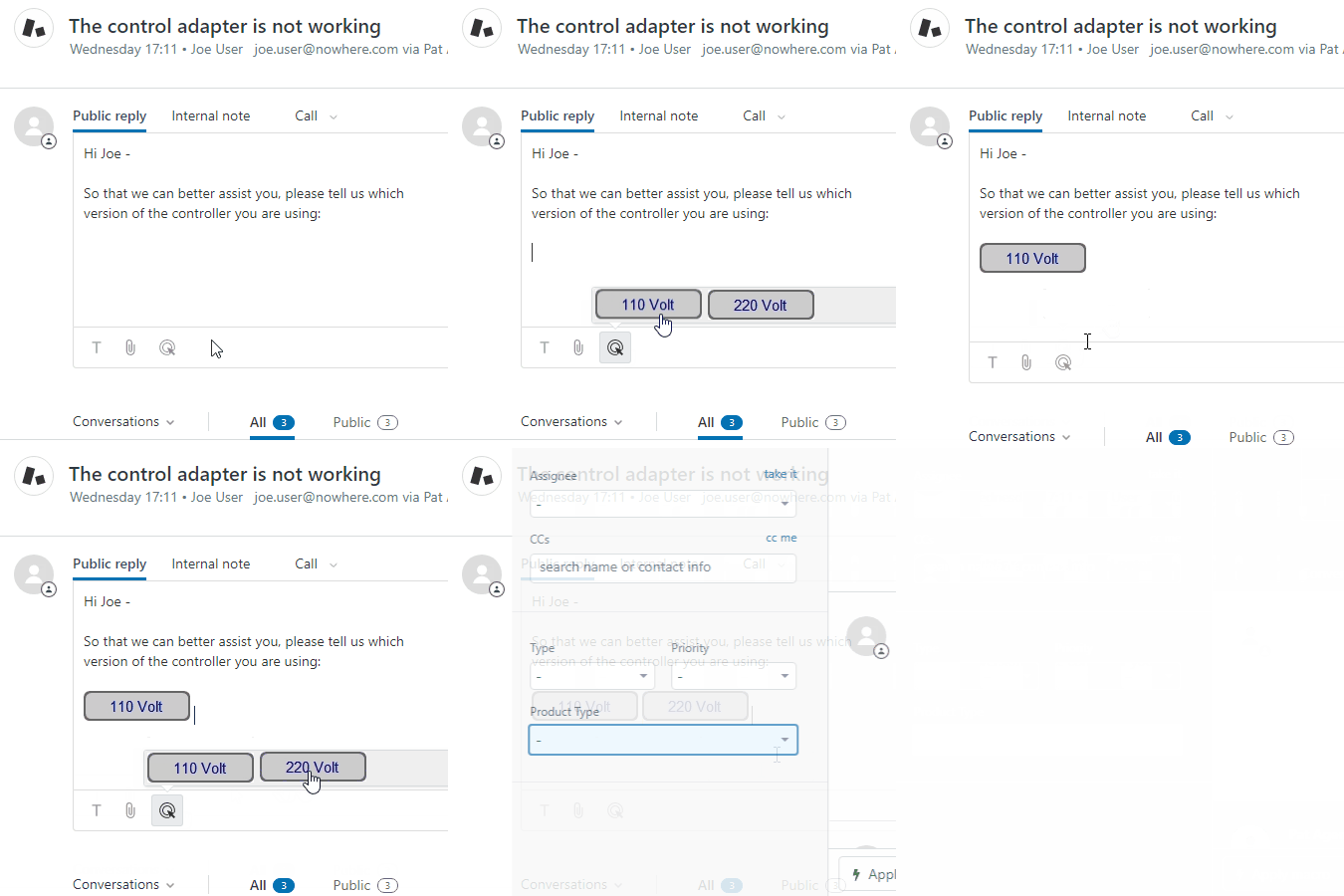
One click, dozens of workflows
- Close tickets on confirmation, not silence. "Yes, it's resolved" solves the ticket; "I still need help" sends it straight back to the agent.
- CSAT where one click is the whole survey. "Great", "Okay", or "Not good", right in the email. A bad rating can reopen and escalate instantly.
- Let customers route their own tickets. "Billing", "Technical issue", or "Order status" lands it with the right team.
- Internal approvals from the inbox. Your managers click "Approve" or "Deny", with no agent seat and no login.
- A clean "Talk to a human" button, including on AI agent email replies.
Plus appointment confirmations, refund-or-replace choices, email verification, renewals, IT requests, and Help Center buttons.
Keep your triggers. Add a better input.
Nothing to rebuild. Every click is a normal ticket update, so your triggers, automations, views, and Explore reports pick it up automatically. Stack several actions on one button: set status, add tags, add a public or private comment, update fields, and change priority, type, or assignee.
Go live in minutes
Build a button and choose what it does.
Paste it into a trigger email or macro, or drop it directly into a reply from the ticket editor.
Watch tickets update themselves.
No code, no hosting, no webhooks. We host the buttons and a branded thank-you page, or send customers to your own custom URL or homepage.
Secure by design
Every button link belongs to one ticket and can only run the actions you set. Clicks can't read the ticket or reach any other. Email scanners and link prefetching can't trigger a button; only a real person's click does.
Yours, on any plan
Your colors, fonts, and subdomain. Works on every Zendesk plan, including Team and Growth. $4 per agent with no minimum, or $199/month flat for 50+ agents.
Start your free 14-day trial and send your first one-click email today.
Klick-Zen is made by Acenerate, makers of simply powerful software for support teams. We care about your privacy: Privacy Policy · DPA
Questions? Reach out to us at support@klick-zen.com, or review the documentation here: Docs
Details zur App
Installationsanweisungen
Up and running in 5 steps
- Click "Install" on this page and choose your Zendesk account.
In Zendesk, click the Klick-Zen icon in the left sidebar.
- Review the Terms of Service and click "Authorize".
- Click "Allow" to connect Klick-Zen to Zendesk.
- Refresh your Zendesk browser window. This loads the Klick-Zen toolbar into the ticket editor.
Send your first one-click email
- In Klick-Zen, create a button called "Yes, it's resolved" with the action Status: Solved.
- Paste its snippet into your Notify requester of solved request trigger.
Send yourself a test ticket, solve it, and click the button in the email. The ticket marks itself solved.
Want a head start? Grab one of 30 ready-made trigger email templates, or browse the docs.
Stuck? Email support@klick-zen.com and a real person will answer.
Bewerten Sie uns!
Teilen Sie Ihre Erfahrungen mit der Zendesk Community
Pläne und Preise
Monthly Flat Rate
Free 14-day trial, then $199.00 per month
If your Zendesk instance has 50 or more agents, this option offers a discounted flat monthly rate
Kostenlos testenMonthly Per Agent
Free 14-day trial, then $4.00 per agent, per month
Best for smaller companies; pay per Zendesk Agent, with no minimum
Kostenlos testen